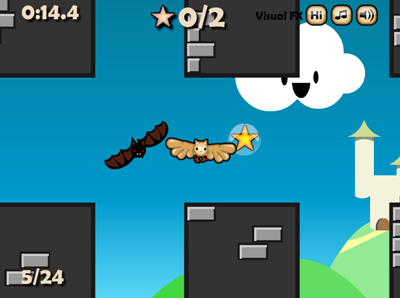
- Miner Dig Deep. Basic graphics, no enemies, you can't die - doesn't sound too exciting right? Well Miner Dig Deep is like crack-cocaine once you get into it. It's a gentle 2D mining platformer where you dig deeper and deeper into the group collecting minerals and selling them to buy better equipment. I thought I would hate this game, but it's probably my pick for Game of Year 2009. My grade: A+ or 5 /5.
- Gerbil Physics. A lovingly polished physics puzzle where you blast Gerbils around beautifully painted backgrounds using bombs. Just like you're average Flash Box2D physics game, but with a bit more polish. It leaves you wanting more levels, but that's just a mark of how much fun it is. My grade: A or 5/5
- Jonny Platform's Biscuit Romp - An old-school puzzle-platformer, with a decidedly British flavour (e.g. you jump on bourbon biscuits) that reminded me of the UK's Amiga/Atari ST indie scene. The puzzles and jumping action are just hard enough without going over. The graphics are generally pretty, apart from the main character, who looks (intentionally?) a bit rubbish. A- or (4/5)
- Ninja Bros. The slick and cool giant pixel art (think Canabalt etc) and a great premise, are slightly detracted by the fairly savage difficulty of this puzzle-platformer. You control 2, 3 or 4 ninjas simultaneously - the thumb-stick makes them all move at once, but each fire button makes a different one jump. They are each in a different room but levers in one room will open doors in another. It's a headf*** and also requires some lightning reflexes, so not really a casual game in any sense. After many attempts I finally cleared the "easy" and "normal" levels, but "Hard" is so far too challenging, so I doubt I'll ever unlock"nightmare". So really I'm only ever going to see half the content. B+ or (4/5);
- Junkyard Battle. A very promising 3D physics stacker, that turns out to be buggy and frustrating. The presentation and premise are both good, but some weird behaviour from the physics engine spoiled it for me. A physics engine is like a wild horse that needs to be tamed, or it will kick you in the face, as happens here, where objects slide up hills and other strange behaviour. The difficulty also ramps up way too quickly. This team should stick at it though and do another game, because there's potential here. C- or (2/5).
Tuesday, 5 January 2010
I bought some Indie Games on XBOX Live (XNA Games)
Monday, 30 November 2009
8 things that annoy me about ActionScript3
- TextField.text can't be set to a number or object, only a String (unlike trace() for example, which will toString() anything you throw at it). There is no logical reason for this that I can see, and makes for some ugly code with String() casts everywhere. You can't really get around it by extending TextField either, if you want a designer to be able to manually move the textfield on the stage in Flash, which I always do.
- You can't tell if a key is down. I don't agree that this is a security threat, and it's a pain when you're doing games.
- No access to stage before addedToStage. I can't really see the reason why this is the case, and it can make code a lot more verbose, as you can't use stage in your constructors, leading to an extra layer of listeners and complexity. And it's worse if you're not actually extending DisplayObject. In my view, stage is a natural Singleton, and generally I treat it as such nowadays by keeping a static reference in one of my classes.
- Events and all those string constants. I always thought there was something fishy about ActionScript events (like how many custom ones you need), and the brilliant example set by Robert Penner's Signals has proved it to me. I've been using Signals on my latest project and filing bug reports (and the odd fix), which Rob pretty much always implements within a day. This is an awesome open source project that gets better by the day - you will never want to use Events again!
- You can't tell if the mouse is hidden. Why have a Mouse.hide() without Mouse.isHidden? It makes no sense, and if you call Mouse.hide() repeatedly it makes the cursor flicker, which again I can't understand as Flash should know not to hide it if it's already hidden. I have created a simple MouseManager class to get round this, but again, why should I have to. Also, I think there is a potential issue around right-clicking showing a hidden mouse without notifying you. While we're on the subject of the mouse, for games you really want to be able to set the cursor position, as you can I think in Unity3D, and have a truly custom right-click, as you can in Silverlight 4.
- The video API is just wrong. Do you know your netstream from your netconnection? None of these things make sense. It should just be videoPlayer.play("video.flv") right?
- The timeline can't destroy movieclips, only remove them from the stage, and if they have any listeners they can't be garbage collected, so playing timelines is a memory leak minefield.
- There are no convenience functions for anything, anywhere. Thanks guys.
Thursday, 12 November 2009
Using Git and Github on Windows
- Download and install "msysgit" from http://code.google.com/p/msysgit/ (from "featured downloads" on the right of the screen). This provides the core command-line Git functionality.
- To make life easier, download and install Tortoise Git from http://code.google.com/p/tortoisegit/ which is just like Tortoise SVN, which I use for SVN, and works great. It's completely visual and feels like native part of Windows.
- Download and install Putty and PuttyGen (I selected the installer for the full suite because I'm not sure exactly which things you might need) - you'll need this to generate an SSH key. http://www.chiark.greenend.org.uk/~sgtatham/putty/download.html
- Create an account on GitHub - https://github.com/
- Create a repository on GitHub.
- In "Account Settings" on GitHub, click on "SSH Public Keys" and add a new key. The title should be your email address. To generate the key itself, use PuttyGen, which you downloaded earlier, and copy-paste it in.
- Right click in the folder which you want to check-in to Git. Select Git Create repository here. Create it.
- Right click in the folder again. From the right-click menu, select Tortoise Git - Settings.
- Make sure Tortoise Git has found MSysGit.
- In Git - Config, add your name and email address - this should match your GitHub settings.
- In Git - Remote, select Add New. Add the private key from Putty that you generated earlier. The private key is a file rather than something you copy-paste. Get the URL and name from the "Source" or "Admin" tabs of your repo on the github website.
- Select all the files you want to check-in, right-click and select Tortoise Git - Add...
- Right click again and select Tortoise Git - Commit -> Master.
- Hopefully it should all upload and you're done!
Wednesday, 11 November 2009
Game Review: Bloodwych (Amiga, Atari ST)
Two people could play it at once, which was revolutionary at the time, and stopped my brother just punching me until I gave him the joystick. 2-player RPGs are brilliant (my wife and I had a blast playing through Balder's Gate Dark Alliance - certainly more fun than watching me ride my horse around Oblivion for hours at a time).
This is the bit where you choose your characters. My brother, of course, took the cool looking knight guy, the cool hooded wizard guy, the hot blonde chick and the cool looking ninja guy. That left me with a blue hermaphrodite thing, Sinbad, a smurf and a f***ing lizard. I didn't care though - this was the coolest thing I'd ever seen!
You can scoff at the graphics all you want, but most people were still playing 8 colour C64 games, so this is basically the f***ing Matrix. My brother soon found that he could threaten to beat me up inside the game unless I gave him all the best loot: basically he invented cyber-bullying 10 years before there was a word for it. I specifically remember one of my guys having to fight with a chicken drum stick.
We played Bloodwych every day and within a few months we had completely worn out the disk and both of the Atari's notorious joystick ports, so we never got to see the cool looking monster on the cover art, which probably wasn't even in the game because cover art was just lies back then.
Monday, 2 November 2009
Game Developers Radio podcast - Flash game design special (with me!)
Video of my talk from Flash On The Beach
FOTB09 - Elevator Pitch - Iain Lobb from John Davey on Vimeo.
Wednesday, 14 October 2009
My thoughts on Flash for iPhone
I was definitely in the “this is neat” camp when I heard the announcement – and here’s the reason: I’m maxed out. I have a list of over 40 ideas for new Flash games, plus probably another 40 old engines that I just need to reskin and launch. This is in addition to all my client work. Then there’s Unity3D which I have been investigating as a route into 3D games, which also requires that I brush up on my 3DS Max skills and C#. On top of all that there’s keeping up with Flash, updating my blog, giving talks etc, and that’s before I even consider my family life and anything resembling a social life. So really learning real iPhone development for the sake of joining the gold rush isn’t even an option or choice for me. But I do have the time to resize the odd game and test it for iPhone, and that’s what I’m going to do. Apple haven’t lost any business from me.
Monday, 28 September 2009
A 3 minute lesson in game design (my talk from Flash on the Beach 09)

Make it fun.
- When you're making games it's easy to get side-tracked by your awesome code framework or particle effect or whatever,
- but if you don't make a fun experience for players, what's the point?
Make it obvious.
- If you need to have an instructions screen on your game, you've already kinda failed.
- Talk to your players through the language of games.
- When you get the power-pill in PacMan, the ghosts go blue, their mouths go wobbly, they start running away.
- The player thinks – ah that's different, maybe I can eat ghosts now – ah yes I can. No instructions necessary.
- Players browse web games like they're flipping channels on cable TV.
- If they're on a site like Kongregate they've got the choice of 18 thousand games.
- So forget all the cut-scenes, menus and tutorials, get straight in to the action.
- Try not to mix mouse and keys. Pick one.
- If you're making a casual puzzle game, just use the mouse.
- If it's a platform game, stick to just arrow keys and spacebar.
- Only if you're going for a pretty hardcore audience is it safe to use mouse and keys together.
- I've worked on far too many projects that had months of planning, emails to clients, design documents, wire frames, PhotoShop mock-ups.
- Not until two weeks before the deadline, you actually start developing.
- The day before the deadline you finally finish it and play it through. Is it fun? No. But it's too late change it.
- So throughout the process, make prototypes, iterate.
- There aren't many games that can survive without characters,
- so even if you're making an abstract physics puzzle, you should be thinking about how you can make it feel human and approachable.
- While there's still time to make changes, put your game in front of real players.
- If you think you've got intuitive controls, players will be mashing the keyboard going “what do I do”?
- If you think it's too easy, to a new player it's probably impossibly hard.
- Don't just make games with Flash, make games for Flash.
- Flash games have there own genres, like physics puzzles and tower defence that have evolved to suit the medium.
- Don't copy other games, but work out what makes them fun.
Monday, 7 September 2009
I'm doing 2 talks in Brighton
- Tuesday September 8th 2009 - The Flash Game School of Wizardry, a mammoth 2 hour live-coding session, where I will be going through my personal philosophy and methodology for creating games. Free! Sign-up at FlashBrighton user group.
- Tuesday September 22nd 2009 - Wizard Needs Food Badly: A 3-minute lesson in game design, a lightning fast top 10 countdown of game design tips. Get tickets from Flash on the Beach.
Thursday, 27 August 2009
Podcasts for designers and developers
- Specifically focussed on the Flash Platform, there is only really The Flex Show and (I'm guessing for a limited time) also Summer of Flash. We have a great blogging community, so there should really be more. For Rich Internet Applications in general, there is also RIA weekly.
- The .NET world is frankly spoiled for decent podcasts, with Elegant Code, Hanselminutes, Herding Code, .NET Rocks!, Spaghetti Code and The Thirsty Developer. I normally skip the epsiodes devoted to the minutiae of .NET and listen to the more general chats about programming techniques, best practices etc.
- For Java, I've only really come across Java Posse, but it is excellent, and covers a broad range of topics, not just Java.
- Boagworld is really the one and only listenable podcast I've found about web design - like Flash this is a topic that I thought would generate more content.
- About programming in the general, there is the excellent Stackoverflow podcast with Jeff Atwood and Joel Spolsky, two very smart and funny developers.
Tuesday, 25 August 2009
Are you a Flash outlier?
- Age. What's the ideal age to be a successful Flash developer? From my observations, most the well known developers in the blogosphere and conference circuit are between about 32-38, meaning they were born between about 1971-1977. This is also the age range of most the CEOs, CTOs and Creative Directors of Flash shops, that I have met. Why is this the case? Well, these people were in their mid-twenties when Flash became popular. They had the skills and the life experience neccessary to grab chance, and establish themselves as experts.
- Mix of design and development skills. In the early days, there weren't really designers and developers in the Flash world, there were just "Flashers", so to have a mix of both skills was a definitely advantage. I'd argue that Flex changed all that, and largely for the worse.
- Able to work in Western Europe or North America. Flashers seem to congregate in certain geographical areas, such as California, South East England and Toronto. While there are Flashers in many other places, these areas are a great place to start your career because it's much easier to find work.
- Education. Happily I don't think it makes a huge difference where or even if you went to college. Flash is a real meritocracy in this respect.
- Able to write English well. Many of the most well-known Flashers are probably not the greatest developers out there, but they are able to communicate what they know effectively and this brings it's own rewards.
Tuesday, 7 July 2009
C# envy: properties
public int x { get; private set; }
Or if you want both public, it would be:public int x { get; set; }
private var _x:int;
public function get x():int
{
return _x;
}
public function set x(_x:int):void
{
this._x = _x;
}Monday, 6 July 2009
A new manifesto for Flash games

Danc over at Lost Garden has just released an inspiring call to action for Flash games developers. This is probably the most important thing I have read about Flash games, ever. In it he makes a good case for something I've known for a while - that the ad-funded Flash games business model undervalues developers efforts by a factor of 100! If you don't want to read it, the jist is that indie Flash games creators need to grow a pair and start asking for some money. But I suggest you read it.
Thursday, 25 June 2009
Suggestions for RSS feed of Flash game developer blogs, and a look a Yahoo! pipes

Wednesday, 24 June 2009
Open-source ActionScript libraries for creating Flash games
- Glaze - super-fast, easy to use rigid body physics engine based on Chipmunk. Prettier syntax than box2D. Demo.
- Box2D - uglier (sorry) syntax than Glaze, but has more features (e.g. types of joint), and is better documented.
- PushButtonEngine - framework to build games on - doesn't do too much out of the box, but is an admirable attempt to standardise Flash game code structure. Demo.
- Collision Detection Kit - Pixel perfect collisions in Flash!
- Game Poetry (blog) and CheezeWorld (blog)- these excellent blogs post the source for many of their examples and tutorials on google code.
- PixelBlitz - engine for retro -stylee games. Blurb from Photon Storm.
- Flixel - another retro-engine. Cool Demo!
- PaperVision3D -if you want to go into the third dimension, this is the daddy. Also check out Away3D - it has some features that haven't yet made it to PaperVision3D. Hey, different strokes for different folks!
- Jiglib Flash - Physics in 3D!!!
- TweenMax - since fusekit was was sadly never ported to AS3, this tweening powerhouse has taken over the whole show. Not only is it great for animating your user-interface, menus etc, I have actually built whole minigames using only this library for all movement and animation. Also gives you quick ways to adjust brightness/contrast etc of images. Only downside is that it is time-based only so won't play nicely with your game if it has a frame-based tick - but this option has been added to the beta, and as you read this is probably now in the live version. If you need frame-based tweening, you can also check out GTween, although Grant is discontinuing the project.